Cursor and Claude Code seem to be the most popular coding agents right now. Some have decided on their favorite, some go back and forth, and some use it concurrently. I’ve seen a lot of cursory (pun intended) comparisons online and realized I needed to do my own research.
The most obvious difference between Cursor and Claude Code is the UX: Cursor is an IDE and Claude Code is a CLI. But Claude Code has an IDE extension and Cursor has a CLI. It’s also clear that if you want autocomplete or if you want access to multiple models under one subscription, Cursor is the way to go. Besides that, what really matters is how effectively the agents actually work, and their costs.
Semantic Search
In addition to pure file searching with tools like grep, Cursor uses semantic search. From their docs:
Semantic search finds code by understanding its meaning, not just matching text. Ask natural language questions like "where is authentication handled?" and get relevant results across your entire codebase. … If you ask Agent to "update the top navigation", semantic search can find
header.tsxeven though the word "navigation" doesn't appear in the filename. This works because the embeddings understand that "header" and "top navigation" are semantically related. … Agent uses both grep and semantic search together. Grep excels at finding exact patterns, while semantic search excels at finding conceptually similar code. This combination delivers the best results.
That docs page also provides a great explanation for how semantic search works. Basically, it splits your code into meaningful chunks and converts (embeds) them into a vector using AI models. Then when you search, your search query is also converted into a vector and matched to the closest embedding.
They quantify the benefits in this article:
To support semantic search, we’ve trained our own embedding model and built indexing pipelines for fast retrieval. While you could rely exclusively on grep and similar command-line tools for search, we've found that semantic search significantly improves agent performance, especially over large codebases:
- Achieving on average 12.5% higher accuracy in answering questions (6.5%–23.5% depending on the model).
- Producing code changes that are more likely to be retained in codebases.
- Requiring fewer iterations for users to arrive at a correct solution.
- Increasing accuracy across all models we tested, including all frontier coding models.
They evaluated this through both offline benchmarks (testing how how effective it was at “retrieving information in codebases with known correct answers”) and A/B testing with real users. Both evaluations found significant improvement, as shown in the article.
The search in Claude Code is just grep. I did find claude-context and LEANN which add semantic search to Claude Code via MCP, the latter fully locally.
Context Window
If you're using multiple AI coding tools, you've probably assumed they all handle context the same way (spoiler alert: they don’t). According to a detailed comparison from Qodo's engineering team, Claude Code provides a "more dependable and explicit 200K-token context window," while Cursor's "practical usage often falls short of the theoretical 200K limit" due to "internal truncation for performance or cost management." The system applies internal safeguards that silently reduce your effective context.
I believe he’s referring to this article. I don’t think the article is a great source, as it’s mainly a marketing article, written by a community manager to get you to buy Qodo (an AI code review product). The point about context is based on community forum posts, and the only one they linked to was from February 2025 and doesn’t support their specific point that “usable context often falls short, sometimes limited to 70k–120k tokens in practice.”
When I go into cursor, type “test”, and see how much context is used, it says 6.3%. (It doesn’t give me an option to break that down.) When I go into a fresh Claude instance, /context breaks down context usage. It lists System prompt as taking 1.5% and System tools as taking 8.3%. So this would indicate that Cursor uses less context, at least to start.
Anecdotally, the Cursor context seems to fill up more slowly than Claude Code for me. This Reddit post seems to validate the experience of Cursor being better at context due to Semantic Search.
Pricing and Transparency
Both Claude and Cursor offer multiple levels of subscription, and an on-demand usage option for when your subscription runs out.
| Cursor | Claude |
|---|---|
| Free Limited agent requests, limited tab completions |
Free No Claude Code access |
| Pro — $20/mo | Pro — $20/mo or $200/year |
| Pro+ — $60/mo 3x Pro usage |
Max 5x — $100/mo 5x Pro usage |
| Ultra — $200/mo 20x Pro usage |
Max 20x — $200/mo 20x Pro usage |
Claude Code
Session Limits
The usage you get out of, for example, a $20 subscription is higher than what you’d get by paying for the underlying model via API pricing; Anthropic subsidizes model usage to keep you on their platform. It’s difficult, though, to determine exactly how much extra value you’re getting.
Claude Code subscriptions give you a 5-hour limit and a weekly limit. These limits are not given in tokens or any other unit; they are simply percentages. This makes it hard to compare with their API rates. It makes sense that it wouldn’t be in tokens, as Opus costs more per token than Sonnet. But it’s not clear what other factors are considered or how they’re incorporated. This is all we get from Anthropic:
Your usage is affected by several factors, including the length and complexity of your conversations, the features you use, and which Claude model you're chatting with.
And:
Claude Code usage varies based on project complexity, codebase size, and auto-accept settings. Using more compute-intensive models will cause you to hit your usage limits sooner.
Many users complain about this lack of transparency. Recently some were claiming that the weekly limits were shrinking. And without numbers, there’s no way to verify that.
The Usage and Cost API seems to provide more usage data, but this is part of the Admin API, unavailable for individual accounts.
“Conversations”
In the documentation, the usage that the Pro and Max plans provide are described in terms of ”conversations” and “messages”, language that makes more sense if you were using Claude as a chatbot rather than Claude Code. A support article describes the Max plans (emphasis my own):
The number of messages you can send per session will vary based on the length of your messages, including the size of files you attach, the length of current conversation, and the model or feature you use. Your session-based usage limit will reset every five hours. If your conversations are relatively short and use a less compute-intensive model, with the Max plan at 5x more usage, you can expect to send at least 225 messages every five hours, and with the Max plan at 20x more usage, at least 900 messages every five hours, often more depending on message length, conversation length, and Claude's current capacity. These estimates are based on how Claude works today. In the future, we'll add new capabilities (some might use more of your usage, others less) but we're always working to give you the best value on your current plan. … To manage capacity and ensure fair access to all users, we may limit your usage in other ways, such as weekly and monthly caps or model and feature usage, at our discretion.
225 messages is indeed 5x the 45 messages Anthropic says we can expect from the Pro plan:
If your conversations are relatively short (approximately 200 English sentences, assuming your sentences are around 15-20 words) and use a less compute-intensive model, you can expect to send around 45 messages every five hours, often more depending on Claude’s current capacity.
The way I understand this is that since Claude uses your full conversation as context for each request, you need a relatively short conversation to expect to send 45 messages. When we use Claude Code, our context will likely be more than 200 English sentences. But none of this is very useful anyway. How long is a message? Which models are “less compute-intensive”? Haiku? What can we expect if we use Opus?
My takeaway is that, when you use Claude Code, the usage limits are a black box. Anthropic makes effectively no specific claims about the usage you’re purchasing. They reserve the right to limit your usage in unspecified ways. The limits might work differently from month to month.
Cursor
When you use Cursor, model cost is at the mercy of the model providers. This means that Sonnet and Opus are charged at API pricing, a worse deal than Claude Code’s subscription based pricing. They list the model pricing here. Of note:
- You would expect Cursor’s own Composer model to be cheaper than the other models, but it’s the same price as GPT-5.2 Codex.
- Claude 4.5 Opus is listed at $20/1M token of output on Cursor’s pricing chart but $25/1M token of output on Anthropic’s API pricing. I’m not sure if the pricing chart is simply out of date, or if we’re really getting cheaper pricing from Cursor.
- On Open AI’s Platform Pricing page GPT-5.2 and GPT-5.2 Codex are priced the same ($1.75 per 1M tokens of input); on Cursor’s pricing chart, GPT-5.2 Codex is cheaper ($1.25).
- Since Cursor is providing tokens at API rates, they aren’t taking anything off the topic. If you use all the usage you pay for, both Cursor and Anthropic appear to be losing money off of their plans.
- Not listed is Cursor’s Auto option, which “allows Cursor to select the premium model best fit for the immediate task and with the highest reliability based on current demand. This feature can detect degraded output performance and automatically switch models to resolve it.” This option is very cheap (see my screenshot below), but the cost per token is not the same each time, and Cursor won’t tell you which models have been chosen.
Your $20 subscription to Cursor means $20 of API-priced usage of whichever models you choose. This makes your usage very transparent. Although it isn’t shown by default, can turn on a usage bar in the editor in Settings → Editor → Usage Summary.
On the Usage page of the dashboard, you can see all of your requests and the amount it took out of your subscription. You can even export the list to a CSV.

This makes it easy to pace your usage and compare models. If you’re using Anthropic’s models, you’ll be getting less value than Claude Code. But you’re gaining the transparency that Claude Code users don’t have, and the ability to switch models at any time.
Extra Usage
When you run out of your monthly usage in the middle of a prompt, Claude prompts you to either exit or wait until your usage resets. If you choose wait, it won’t actually resume once you have more usage; you will have to send a new prompt (I usually just say “Continue”).
When you run out of your monthly usage with Cursor, the agent keeps going. It lets you send new prompts after your usage runs out, indicating that it’s giving you some “free usage”:
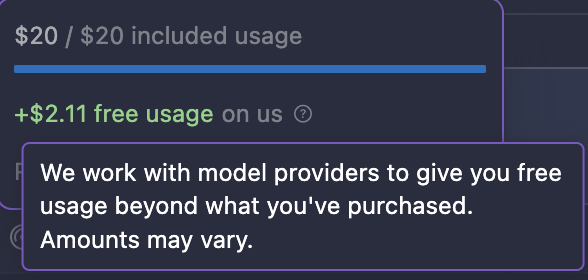
On their Pricing page, they describe this “bonus usage”:
We work hard to grant additional bonus capacity beyond the guaranteed included usage. Since different models have different API costs, your model selection affects token output and how quickly your included usage is consumed. You can view usage and token breakdowns on your dashboard. Limit notifications are routinely shown in the editor.
I’ve only started using Cursor this month, so I’ll be putting the bonus usage to the test using GPT-5.2 Codex. But online, it seems you can get an incredible amount of free usage (one user got $175.97 on top of their $20 plan).
Here is where Cursor does lack transparency. Any statement by the company on bonus usage vaguely describes it as being determined by “different factors”. For example, August, a mod on the r/cursor reddit commented:
Bonus usage depends on our inference capacity. We always give at least the $ of included usage you pay for, and then hope to give as much bonus usage as we can. The value will fluctuate based on load.
Model choice seems to be a major factor in how much free usage you get; I’m not sure whether this is simply because of the raw cost difference in models or because Cursor has different deals with different providers.
An Ongoing Battle
Cursor and Anthropic are both making rapid improvements. Cursor recently improved their Bugbot, something I hope to investigate in future versions of this article. Claude Code has a “Claude Code on the web” in research preview to compete with Cursor’s web interface for running agents. (I personally prefer to stay within arm’s reach of the code when running prompts.) As I was writing this article, Claude Code introduced Tool Search, which loads your MCP servers only when they’re needed—competing with Cursor’s Dynamic Context Discover released a week earlier. It’s clear that whichever tool you choose, you’re at the vanguard of agentic coding tools.
I personally use both. I’m still writing code, so I love Cursor’s autocomplete features. Opus 4.5 is my preferred model, and I find that using it within Cursor blasts through my Cursor usage. For my Opus usage, I want to take full advantage of Anthropic’s subsidies (whatever they are). But when I do hit my 5-hour limit, I’ll turn to Cursor, using GPT 5.2 Codex. I’ll also use 5.2 Codex to refactor Claude’s code, and for a complex feature I might have both Codex and Opus 4.5 try to solve it. I’ve also enjoyed Cursor’s Bugbot, but I haven’t tried any Claude Code code review setups.
I’ll keep this article up to date with future developments in these tools, and I’ll also consider writing up others like Opencode and Antigravity. If your experiences differ than mine, feel free to reach out!